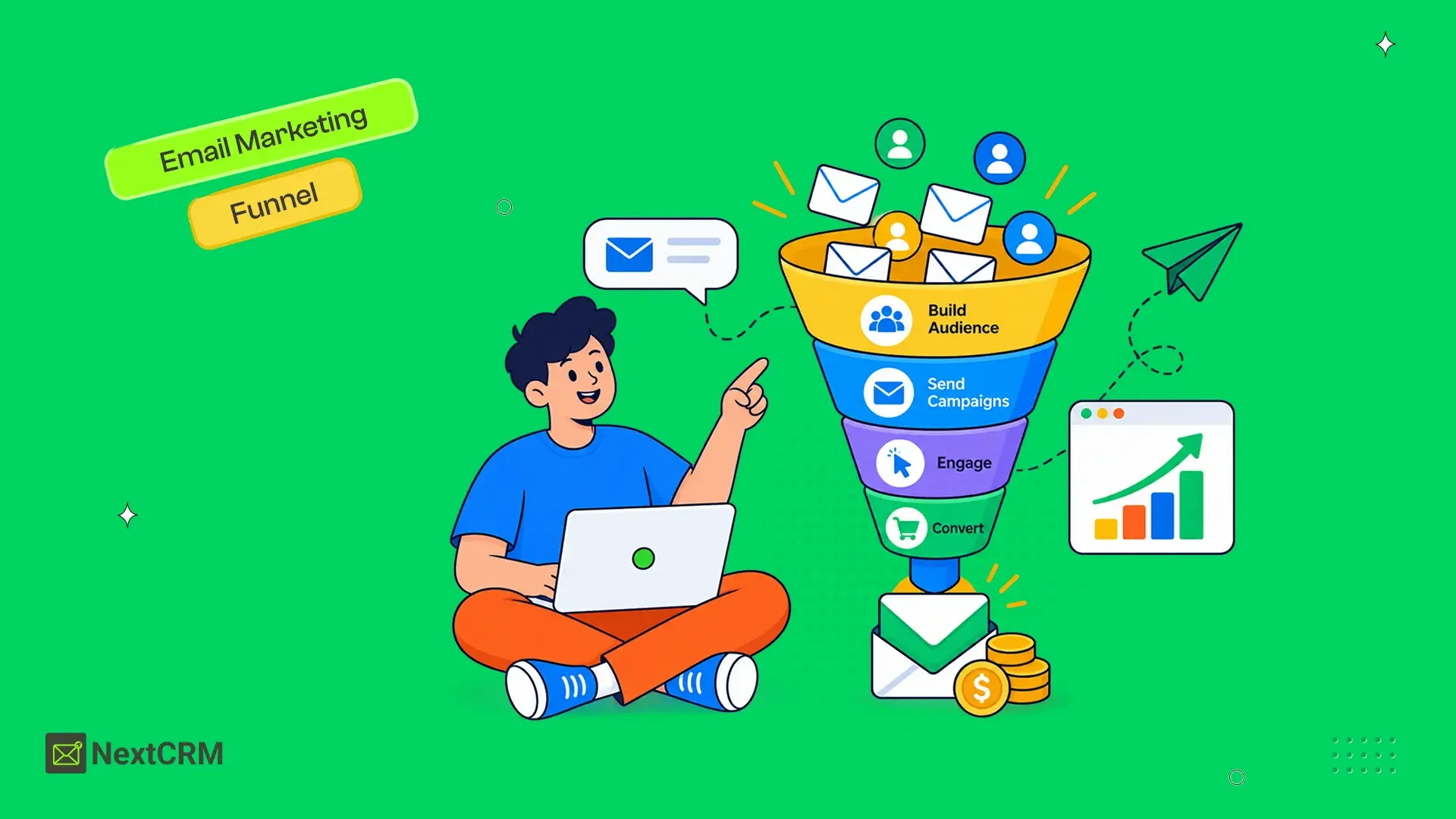
An email marketing funnel is a planned system of messages and decision rules that helps opted-in contacts move toward a defined business goal, such as a purchase or booking. A useful funnel connects customer signals with relevant emails, clear entry and exit conditions, and measurable outcomes instead of relying on stage labels alone.
Most email funnel diagrams look simple. A subscriber becomes aware, shows interest, considers an offer, buys, and eventually becomes loyal.
Real customers are less predictable. Someone might read several emails without clicking, visit your product page directly, buy before the next scheduled message, or return weeks later from another channel. A useful email funnel has to account for that behavior.
Instead of asking only which stage someone belongs to, it helps to ask four practical questions. What do we actually know about this contact? Which message makes sense next? When would that message become unnecessary? And how will we know the funnel worked?
This guide uses a simple signal-to-outcome model to answer those questions. Each part of the funnel connects an observable customer signal with an email decision, an exit condition, and a measurable result.
What is an email marketing funnel?
An email marketing funnel is a structured customer journey that uses email, customer data, and automation rules to move eligible contacts toward a specific outcome.
That outcome could be a first purchase, a consultation booking, a product activation, a renewal, or another action that matters to the business.
An email funnel is broader than an email sequence. A sequence describes the order of messages, while a funnel also defines who should enter, what changes the next step, when someone should leave, and how the outcome will be measured.
| Concept | What it describes | Main question it answers |
| Email funnel | The overall journey, rules, emails, exits, and outcome | What should happen as the contact moves toward the goal? |
| Email sequence | An ordered set of messages | Which email should be sent next? |
| Automation | The mechanism that executes triggers, delays, conditions, and actions | When and why should something happen automatically? |
These concepts can overlap. A segmented newsletter might support the consideration stage of a funnel, while an automated welcome sequence handles new subscribers and a separate post-purchase workflow helps new customers.
For a broader foundation, the NextCRM guide to WordPress email marketing explains lists, segmentation, campaigns, automation, and measurement across the wider email marketing process.
The number of stages matters less than the decisions behind them. A useful funnel tells you why a person should receive a message now and what should happen if their situation changes before the next one is sent.
Match funnel stages to real customer signals
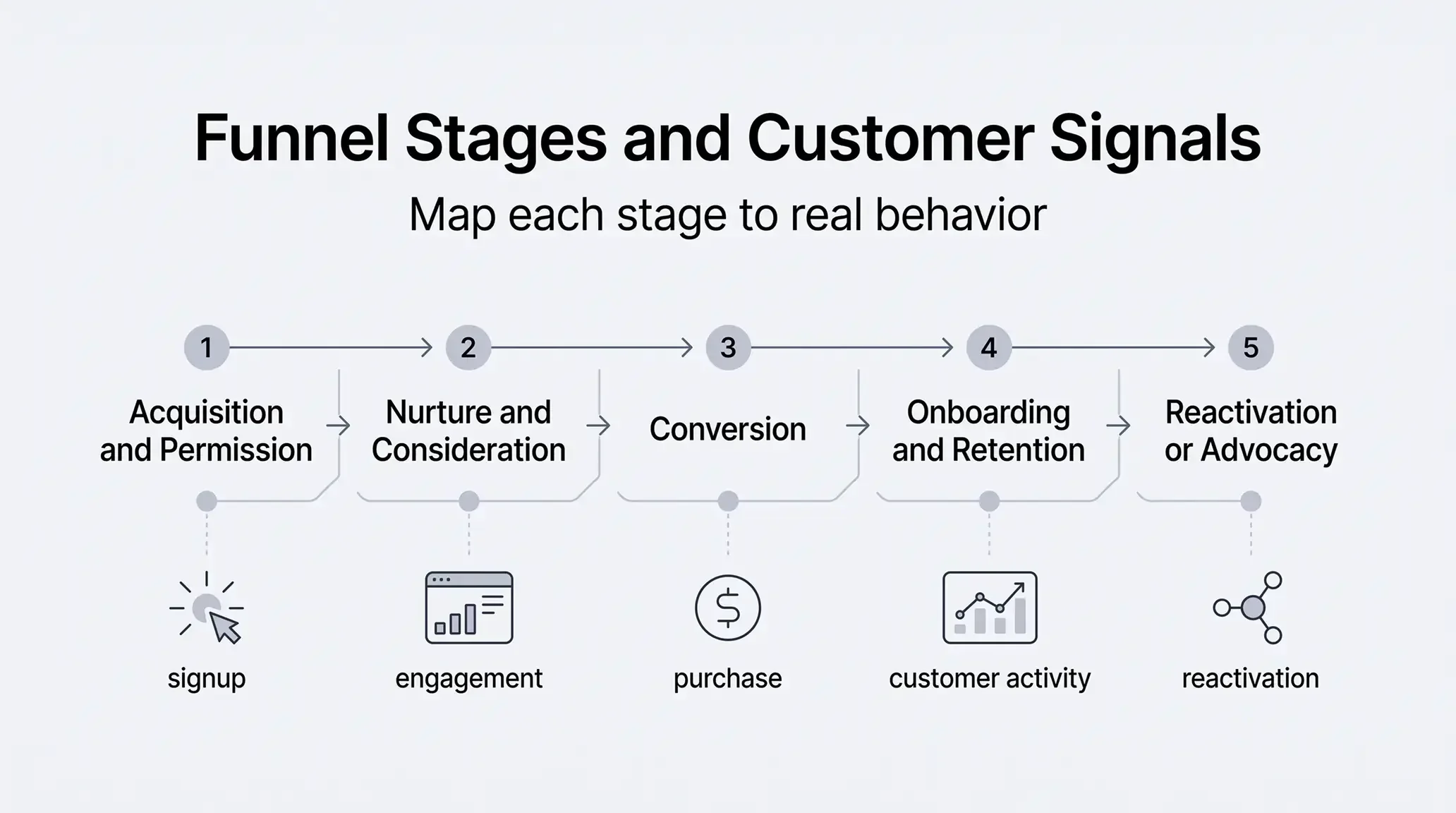
Funnel stages are most useful when they connect to observable information instead of assumptions about what a subscriber is thinking.
An email open does not automatically mean someone is ready to buy. A click may show interest, but it still does not prove purchase intent. Customer status, declared preferences, relevant site activity, bookings, and completed purchases usually provide stronger context.
Five practical stages of an email marketing funnel
For practical planning, you can group an email funnel into five broad stages.
| Funnel stage | Observable signal | Customer need | Email job | Exit or next state | Primary measure |
| Acquisition and permission | Form signup, explicit subscription, lead magnet request | Receive promised value and understand the relationship | Welcome, deliver resource, set expectations | Suppression, nurture, or stronger interest | Eligible signups |
| Nurture and consideration | Declared interest, relevant activity, useful email interaction | Understand the problem and evaluate fit | Educate, answer objections, show use cases | Purchase, booking, inactivity, or continued nurture | Meaningful progression |
| Conversion | Verified buying or booking action | Reduce final uncertainty and complete the decision | Clarify offer, answer final questions, support checkout | Paid order, accepted booking, or continued nurture | Funnel conversion |
| Onboarding and retention | Verified customer or completed conversion | Get value from the purchase and continue the relationship | Onboard, educate, support, recommend useful next actions | Repeat engagement, repeat purchase, inactivity | Activation and retention |
| Reactivation or advocacy | Meaningful inactivity or demonstrated customer satisfaction | Find a reason to return or participate | Win back, request feedback, introduce loyalty or referral activity | Re-engagement, sunset, repeat purchase, advocacy | Reactivation or repeat outcome |
This is a practical planning model, not a universal industry standard. Some businesses will split these stages further, while others will combine them.
What matters is that each stage has a different job. A new subscriber who downloaded a guide probably needs useful education. Someone comparing a product may need answers about fit or pricing. A recent customer usually needs onboarding or product help rather than another first-purchase promotion.
Why opens and clicks need context
Open and click data can help you understand engagement, but they should not automatically define a subscriber’s stage.
Apple Mail privacy settings can affect open tracking. Mailchimp’s explanation of bot activity also shows how security systems may create automated engagement events.
That is why stronger customer signals matter. A verified purchase, booking, declared preference, or relevant account action usually gives you more useful context than an open alone.
Plan one complete email marketing funnel
A useful funnel starts with one audience and one measurable outcome before any automation is built.
Consider a hypothetical WordPress store selling a home coffee starter kit. The store offers a downloadable brewing guide, and people can subscribe to receive it.
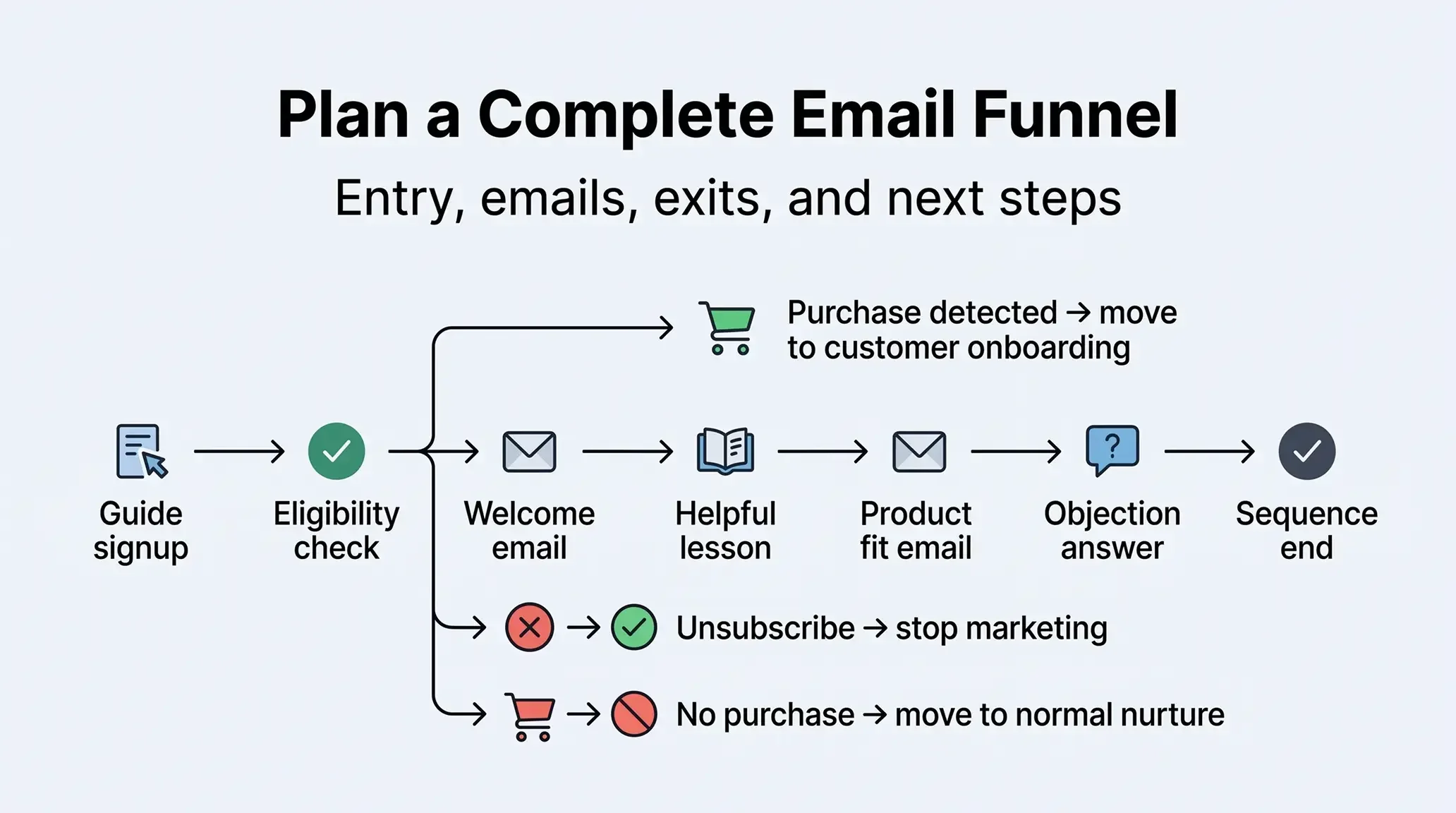
The business wants to help interested noncustomers understand the product and eventually make their first purchase. It does not want the sequence to keep promoting the starter kit after someone has already bought it.
The example below is a planning model. The timing and numbers are illustrative, so do not use them as universal benchmarks..
Choose one audience and one measurable goal
The audience is opted-in noncustomers who requested the brewing guide. The goal is a first paid starter-kit order within 14 days of enrollment.
That is more useful than a vague objective such as increasing engagement because the business now has a defined success condition. It also gives the business a clear reason to stop acquisition messaging once the contact reaches the goal.
Before scheduling the first email, the system should know enough about the contact to decide whether they belong in the sequence. Useful information may include marketing permission, signup source, current customer status, enrollment time, and relevant purchase history.
It should also be clear whether someone can enter the same workflow more than once. Without an enrollment rule, a repeat form submission could accidentally restart the sequence.
Write each email around a specific customer need
The sequence should begin by delivering the value that earned the signup and gradually move toward helping the subscriber make a decision.
| Step | Illustrative timing | Message job | Example subject | Main action | Exit check |
| Welcome | After eligibility is confirmed | Deliver the promised guide | Your guide to better coffee at home | Read the guide | Stop if already a customer or suppressed |
| Helpful lesson | Day 2 | Solve a relevant problem | Fix a bitter brew in three steps | Read the lesson | Recheck permission and customer status |
| Product fit | Day 5 | Connect the problem to the offer | Is this starter kit right for your setup? | View the kit | Exit acquisition flow after verified purchase |
| Objection answer | Day 8 | Resolve fit, shipping, care, or return concerns | What to know before choosing your kit | Read FAQ or buy | Do not send if a purchase already occurred |
| Sequence end | Day 14 | End acquisition messaging cleanly | No additional sales email required | Move to the appropriate next state | Buyer to customer path, nonbuyer to normal nurture |
Four acquisition emails are enough for this example because each message has a clear job. Adding more emails would only help if they solved an additional customer problem.
The welcome email fulfills the original promise. Next, the second email helps with a practical brewing issue. The third connects that problem to the product. The fourth handles questions that might prevent someone from buying.
Then the acquisition sequence ends instead of becoming an endless promotional loop.
Define what makes someone leave the funnel
Exit rules matter because a contact’s situation can change while they are waiting for the next message.
If the subscriber buys on day four, the day-five acquisition email no longer makes sense. The contact should move into a customer path instead.
The same principle applies when someone unsubscribes. The system should not send a future marketing message simply because it had already been planned before the person’s status changed.
Contacts who reach day 14 without purchasing can move into normal educational nurture if they remain eligible. They do not need to restart the same sequence automatically.
A service business can use the same structure. Instead of measuring a paid product order, the conversion might be an accepted consultation booking. Once that booking exists, acquisition messaging should stop, and the contact should move into the appropriate client communication workflow.
The broader lesson is simple. A funnel should respond to the customer’s current state rather than blindly complete every message that was scheduled at the beginning.
Implement the funnel in WordPress
A WordPress email funnel needs contact data, a clear entry event, automation rules, a sending layer, and a way to test whether the intended paths actually work.
The funnel plan should come first. Software is there to execute that plan, not decide the strategy for you.
If you are still building the broader setup, the complete WordPress email marketing guide covers the wider foundation.
Connect forms to useful contact data
A form submission should create or update the contact information needed by the workflow before automation begins.
NextCRM documents how to map form submissions to contacts. This can give the workflow useful customer context, but The system should not automatically treat a form submission as permission to send every type of marketing message.
The system should distinguish contact data from marketing eligibility. Signup source, subscription status, declared interests, and customer status can all influence whether someone should enter a particular funnel.
That extra context helps prevent an existing customer from being treated like a brand-new prospect.
Build the trigger, delay, and decision logic
Every automation needs a clear event that makes a contact eligible to enter.
NextCRM’s public documentation explains available automation triggers along with automation conditions and actions.
A typical workflow might begin with a form or contact event, wait for a defined period, and then check the contact’s current state before sending the next message.
The check before each important email matters as much as the delay itself. Someone can buy, unsubscribe, change status, or become ineligible while the automation is waiting.
A delay tells the system when to look again. The conditions determine whether the system should still send the planned message.
Treat a paid purchase as a real state change
Purchase logic needs to define what actually counts as a completed conversion.
Creating an order is not always the same as receiving payment. WooCommerce order status documentation explains that orders can pass through different states depending on the payment and fulfillment process.
For a real store, the funnel should use a paid-state rule that matches the site’s payment setup.
A practical policy might be simple. Once the system records a verified paid order, the contact leaves the acquisition sequence and moves into the customer path.
The exact behavior of queued messages, repeated events, cancellation timing, and overlapping automations should still be tested on the installed product version before they are described as guaranteed behavior.
Test the customer path before launch
Automation testing should use synthetic contacts before real subscribers depend on the workflow.
At minimum, test one eligible subscriber, one ineligible contact, a purchase during a delay, and an unsubscribe during a delay. Those four paths reveal problems you can easily miss when you test only the happy path.
Scheduling needs its own check. Page loads trigger WP-Cron, which means execution timing may depend on site activity unless another cron configuration is used.
NextCRM also provides documentation for configuring automation scheduling.
The sending system is another separate layer. NextCRM documents how to configure a sending mailbox, but connecting a sending provider does not guarantee inbox placement.
Google’s current email sender guidelines are useful when checking authentication and sender requirements.
A functional test should prove that the right contact enters, the intended message becomes due, the correct exit works, and the sending system accepts the message. Do not present that test as evidence that the funnel will increase sales.
Measure email funnel performance with clear definitions
Email funnel measurement becomes more useful when you define the cohort, conversion event, denominator, and observation period before interpreting the results.
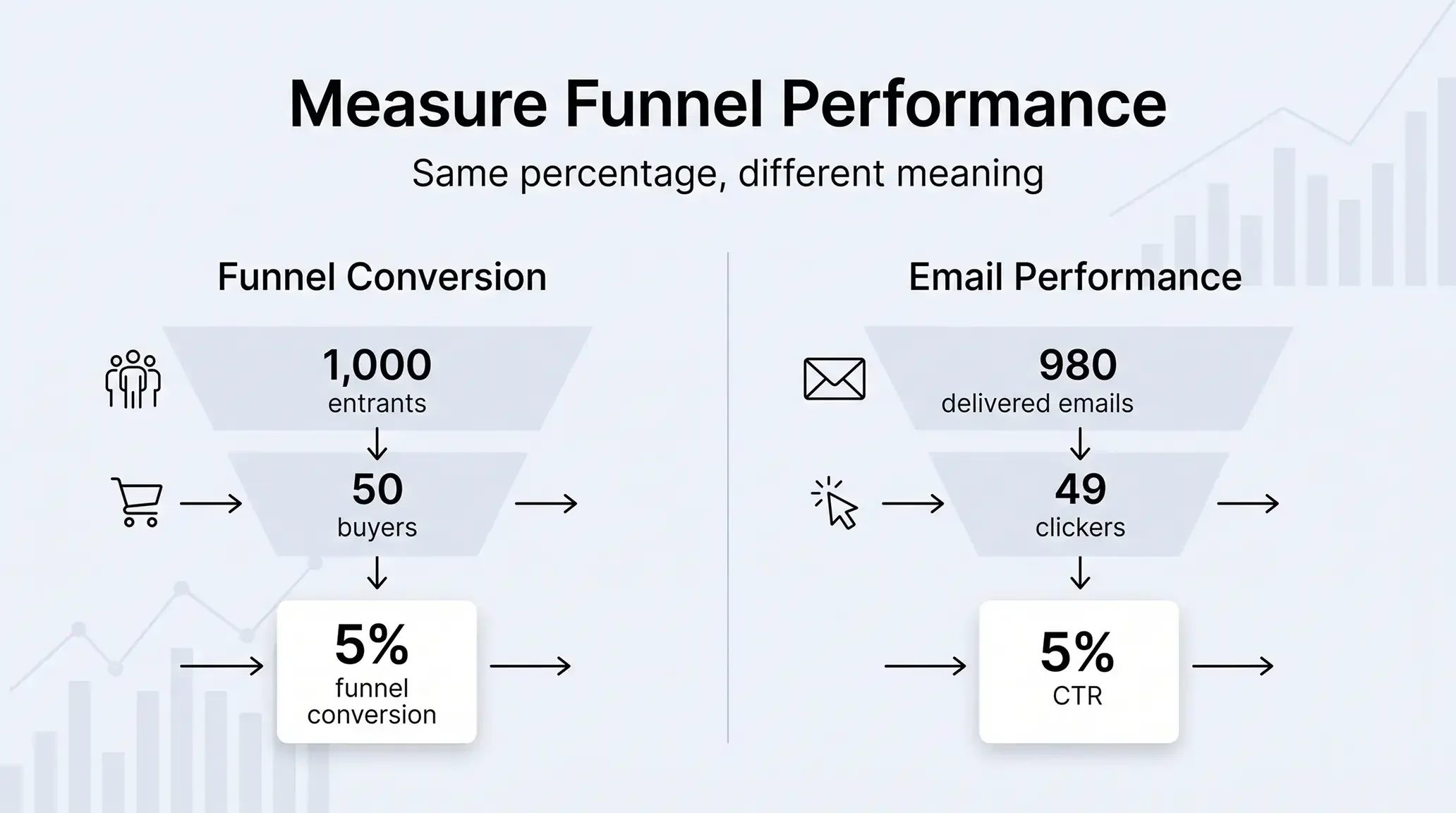
Email metrics and business metrics answer different questions. A click describes interaction with a message, while a paid order describes a business outcome.
Separate email metrics from funnel outcomes
Someone can purchase without clicking the last email, so clicks should not automatically become the denominator for every funnel conversion calculation.
| Metric | Working definition | What it tells you |
| Signup conversion | Eligible signups ÷ relevant unique landing-page visitors | How effectively the entry point creates eligible contacts |
| Email bounce rate | Bounced messages ÷ attempted messages | Whether delivery attempts are failing |
| Delivered-message CTR | Unique tracked clickers ÷ delivered messages | How much tracked interaction a specific email produced |
| Funnel conversion | Unique entrants with the defined outcome ÷ eligible entrants | How many people in the cohort reached the goal |
| Revenue per entrant | Defined cohort revenue ÷ eligible entrants | Revenue associated with each funnel entrant |
| Attributed revenue | Revenue assigned using a stated attribution rule | What the reporting model assigns to marketing activity |
The key is to keep email engagement metrics separate from the business outcome the funnel is designed to create.
Calculate funnel conversion and click-through rate
Suppose 1,000 eligible contacts enter the funnel and 50 complete a qualifying paid purchase during the 14-day measurement period.
The funnel conversion rate is:
50 ÷ 1,000 = 5%
Now suppose one email reaches 980 recipients and 49 distinct recipients generate a tracked click.
The delivered-message CTR is:
49 ÷ 980 = 5%
Both percentages are 5%, but they measure different things. The first tells you how many funnel entrants became buyers. The second tells you how many delivered-email recipients generated a tracked click.
Treat attributed revenue differently from causal lift
Suppose those 1,000 entrants generate $2,800 in defined cohort revenue after the business applies its refund policy.
Revenue per entrant is:
$2,800 ÷ 1,000 = $2.80
That figure does not prove the funnel caused every dollar of revenue.
Attributed revenue tells you what a reporting model assigns to marketing activity. Proving incremental lift requires a controlled comparison, which is a separate measurement exercise.
NextCRM’s public Marketing Intelligence reporting can provide reporting context for WordPress marketers. Confirm exact attribution rules, identity behavior, conversion definitions, and refund treatment before presenting them as fixed product behavior.
Troubleshoot an email funnel from the customer state outward
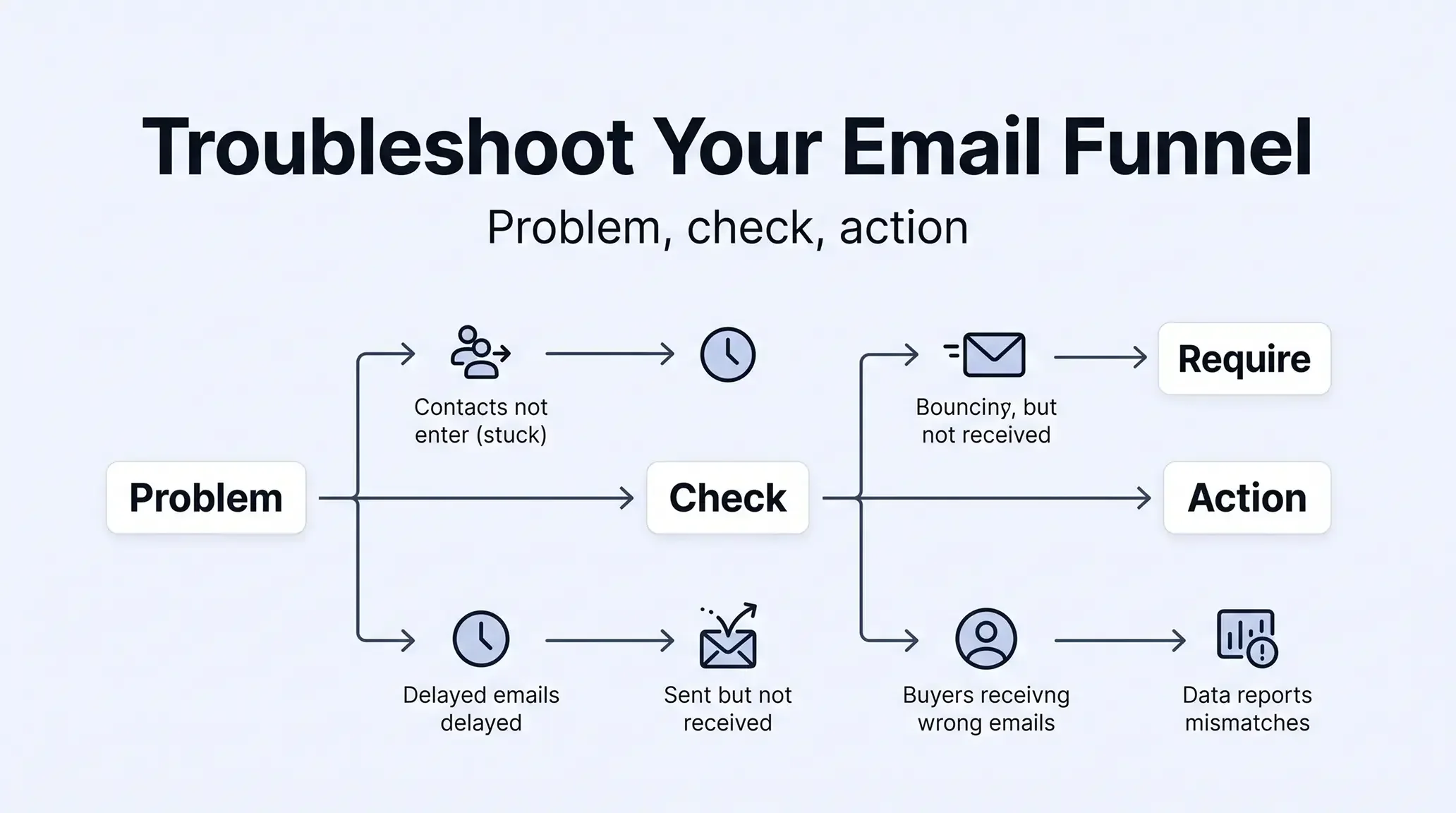
When a funnel breaks, trace the problem through enrollment, automation, sending, and conversion tracking instead of assuming the email content is the cause.
A missing message can have several explanations. The contact may never have entered the workflow, the scheduler may be late, A suppression rule may block the message, the provider may reject it, or the receiving system may filter it.
| Symptom | Check first | Practical next action |
| No contacts enter | Form mapping, status, trigger, exclusions | Test one eligible contact and one ineligible contact |
| Messages run late | Scheduler and automation execution | Check cron configuration and actual execution times |
| Message shows as sent but is not received | Provider response, authentication, suppression, receiving system | Separate provider acceptance from inbox placement |
| Opens are high but meaningful activity is low | Privacy-driven events, bot activity, message relevance | Review stronger actions instead of scoring intent from opens alone |
| Buyers keep receiving acquisition offers | Purchase event mapping, exit timing, customer check | Test a purchase during an active delay |
| Revenue appears twice | Repeated events, order identifiers, reporting rules | Reconcile distinct orders and refund adjustments |
When buyers continue receiving acquisition emails, check whether their purchase state became available before the next message executed.
For delayed messages, inspect whether the automation itself ran on time. When reported revenue looks wrong, identify exactly which orders, contacts, events, and time window the report is counting.
For deeper delivery problems, the WordPress email spam troubleshooting guide covers that topic without turning funnel troubleshooting into a full deliverability guide.
Email marketing funnel FAQs
Email funnel questions usually become easier to answer once the funnel has clear entry, message, exit, and measurement rules.
A practical email marketing funnel can include acquisition and permission, nurture and consideration, conversion, onboarding and retention, followed by reactivation or advocacy when relevant.
The exact number of stages can vary. What matters is defining the purpose of each stage, the customer signal that supports it, and the event that moves someone to the next state.
There is no universal ideal number of emails for a funnel.
Use enough messages to deliver value and help the customer make the next relevant decision. The worked example in this guide uses four acquisition emails because each one has a distinct job.
A shorter or longer sequence may be appropriate when the buying cycle, audience, or conversion goal is different.
Use observable information such as declared interests, relevant activity, customer status, booking state, and purchase history.
Do not treat stage labels as proof of what someone is thinking. An email open alone is too weak to establish buying readiness.
For example, a contact should leave or change paths when the current sequence is no longer appropriate.
Common exit events include a purchase, accepted booking, unsubscribe, suppression, loss of eligibility, or reaching the planned end of the sequence.
Yes. A WordPress email funnel can combine contact data, forms or commerce events, automation rules, sending infrastructure, and reporting.
Map the customer journey before configuring the software. If you use NextCRM, the public documentation for choosing automation triggers and adding conditions and actions provides a starting point for implementing those rules inside WordPress.
Build a funnel you can explain and measure
A useful email marketing funnel starts with one audience, one meaningful outcome, and a clear reason for every message.
Define who can enter, what each email needs to accomplish, and what should cause the sequence to stop. Then decide how you will count the outcome before looking at campaign results.
That signal-to-outcome approach keeps the strategy grounded in observable customer behavior rather than assumptions about where someone sits in a theoretical funnel.
When you implement the plan in WordPress, test the important customer paths before launch and keep product claims within behavior you can actually verify. The goal is not to build the longest automation. It is to build a funnel that sends the right message while it is still relevant and gives you a result you can measure with confidence.